
You are reading API v2 documentationStill using the Legacy API? Access the Legacy API documentation.
The Dailymotion API v2 is a REST API that lets you read and manage your Dailymotion content programmatically. All calls are made over HTTPS to the following base URL:
https://api.dailymotion.com/v2"Try it" directly in the reference
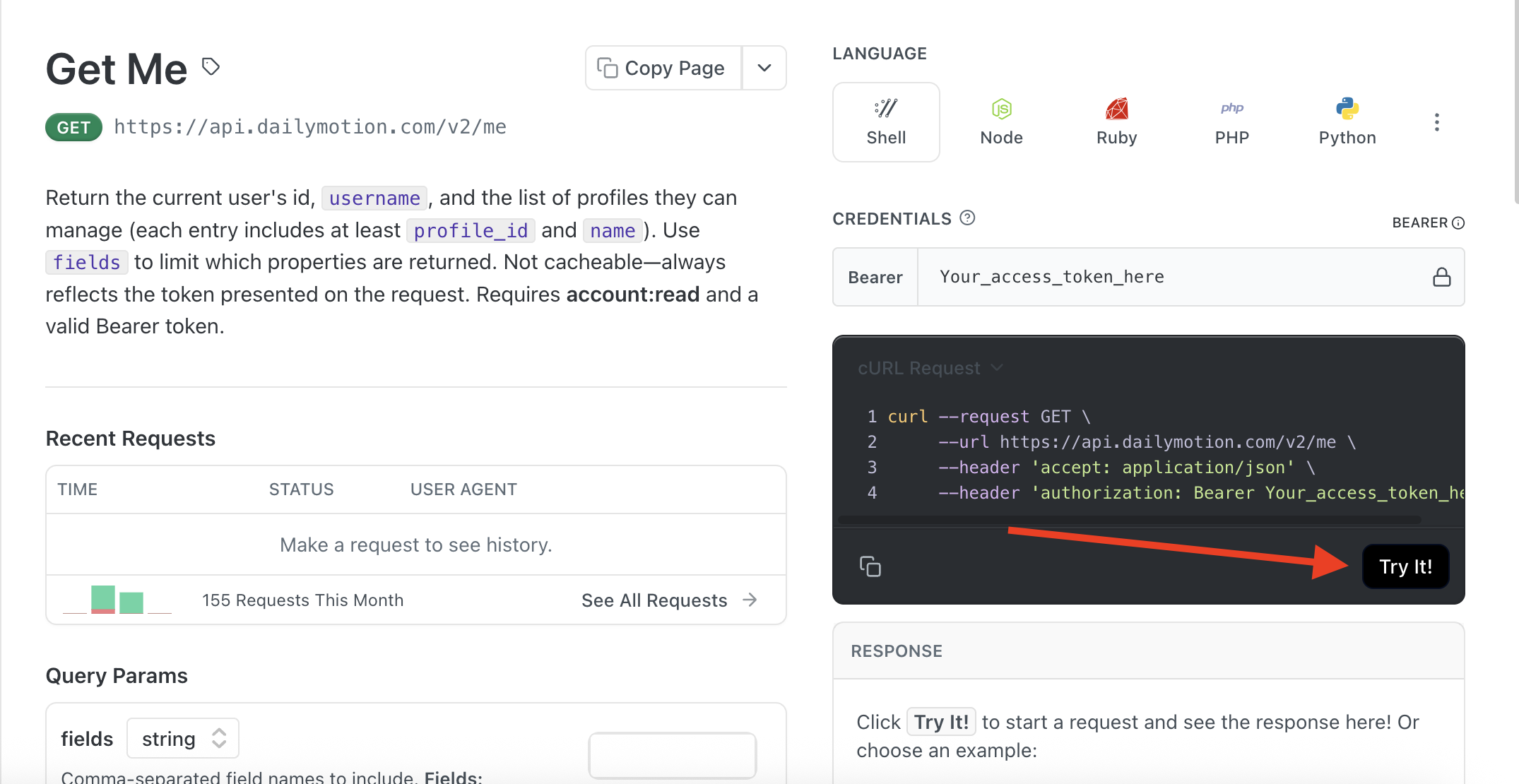
Each endpoint page includes a "Try it" panel on the right.
Enter your access token in the "Credentials" field (Bearer scheme), fill in the parameters and click "Try it!" to send a live request. You'll see the real API response without leaving the docs.
HTTP Methods
The API v2 uses standard HTTP verbs:
GET | Retrieve one or several resources |
POST | Create a new resource |
PATCH | Partially update an existing resource. only send the fields you want to change. Omitted fields are left untouched |
DELETE | Delete resources |
Authentication
All requests require a Bearer access token obtained via OAuth 2.0. Include it in the Authorization header of every request:
--header 'authorization: Bearer <your_access_token>'For details on obtaining an access token, see the Authentication guide.
Objects
Core objects
API v2 is organized around the following core objects. Each object has a unique ID automatically assigned at creation.
| Object | Endpoint | Description |
|---|---|---|
me | /v2/me | Returns the list of profiles (with profile_id and name) that you can manage as an authenticated user. |
video | /v2/videos/{video_id} | Video metadata, publication status, and embedding settings. |
livestream | /v2/livestreams/{livestream_id} | Live stream configuration, ingest, status, and recording. |
player | /v2/players/{player_id} | Player configuration: appearance, playback, advertising settings, etc |
playlist | /v2/playlists/{playlist_id} | An ordered collection of videos. |
profile | /v2/profiles/{profile_id} | Profile identity and branding. |
user | /v2/users/USER_ID | User public details. |
domain_authorization | /v2/domain_authorizations/{id} | Domain verification via ads.txt file. |
app_authorization | /v2/app_authorizations/{id} | App verification via app-ads.txt file. |
Connected objects
All of these objects are connected to each other via relationships: profiles own videos, playlists own videos, organization can create reports, etc. These relationships are called connections and can only be accessed via a nested URL path.
You can explore the connections between objects using the URL structure https://api.dailymotion.com/v2/<OBJECT_CLASS>/<OBJECT_ID>/<CONNECTED_OBJECT>
Examples:
| Action | Nested object | Parent object | Endpoint |
|---|---|---|---|
| Analytics reports scoped to an Organization | analytics_report | organization | /v2/organizations/{organization_id}/analytics_reports |
| Videos listed and created under a specific profile | video | profile | /v2/profiles/{profile_id}/videos |
| List ads.txt file on a profile. | domain_authorization | profile | /v2/profiles/{profile_id}/domain_authorizations |
Selecting fields
API objects are composed of fields that contain different pieces of information.
Some fields are publicly readable, some others are not and require specific scopes granted during authentication. The privacy and required scopes for each field are specified in the reference.
By default, only a small set of fields is returned for each object. Use the fields query parameter to explicitly request the data you need.
Let's see different examples of fields request:
Fields by default
In the example below, we are calling a video object, but we don't request any specific fields to be returned:
GET https://api.dailymotion.com/video/<VIDEO_ID>The JSON response to this call will return the default fields for a video object:
{
"video_id": "xID",
"title": "Title of the video",
"created_at": "2026-01-27T15:29:25Z"
}
Select specific fields
In the below example, we are again calling a video object, but we are specifying the fields we want to be returned. To do so, we are using the fields parameter followed by the field(s) we want, separated by a comma:
GET https://api.dailymotion.com/video/<VIDEO_ID>?fields=video_id,url,publishedThis call will return the following JSON response:
{
"video_id": "xID",
"category": "news",
"visibility": "private"
}
Nested fields
Related fields are organized under a common parent: they are called nested fields.
For example, a video has a thumbnail object that holds all thumbnail URLs in one place. To request or reference a specific field inside a nested object, use dot notation:
object_name.field_name
Examples:
embedding.enable_embed: Whether embedding is allowed for this video.geo_restriction.mode: The geo-restriction mode (allow / deny).
You can request nested fields in fields the same way:
GET /v2/videos/{id}?fields=title,embedding.enable_embed,thumbnail.h1080_urlRequesting the parent object alone (ie. ?fields=embedding) returns only its default fields. To get a specific sub-field, name it explicitly with dot notation.
This same notation is used in PATCH and POST request bodies when updating nested fields:
curl --request PATCH \
     --url https://api.dailymotion.com/v2/videos/<VIDEO_ID> \
     --header 'accept: application/json' \
     --header 'authorization: Bearer <ACCESS_TOKEN>' \
     --header 'content-type: application/json' \
     --data '
{
  "embedding": {
    "enable_embed": true
  }
}
'
Using null to clear a field
null to clear a fieldSome fields in API v2 are nullable, this means that they can hold a value, or be explicitly empty. To clear a nullable field and remove its current value, send it with the value null in your PATCH request.
Example:
Setting description to null removes your video description.
curl --request PATCH \
     --url https://api.dailymotion.com/v2/videos/<VIDEO_ID> \
     --header 'accept: application/json' \
     --header 'authorization: Bearer <ACCESS_TOKEN>' \
     --header 'content-type: application/json' \
     --data '
{
  "description": null
}
'
Not all fields are nullableCheck the field definition in each endpoint's reference page to confirm whether
nullis an accepted value.Sending
nullto a non-nullable field will return a422 Unprocessable Entityerror.