
Generate download URLs
You are reading API v2 documentationStill using the Legacy API? Access the Legacy API documentation.
Download URLs allows Partners to programmatically retrieve video files directly from Dailymotion's CDN using the API.
This guide explains how to generate downloadable video file URLs for your content hosted on Dailymotion.
Prerequisites
Edge plan with add-on Stream URL feature
Reach out to your Dailymotion Customer Success Manager or our Support team if you need to add the feature to your plan.
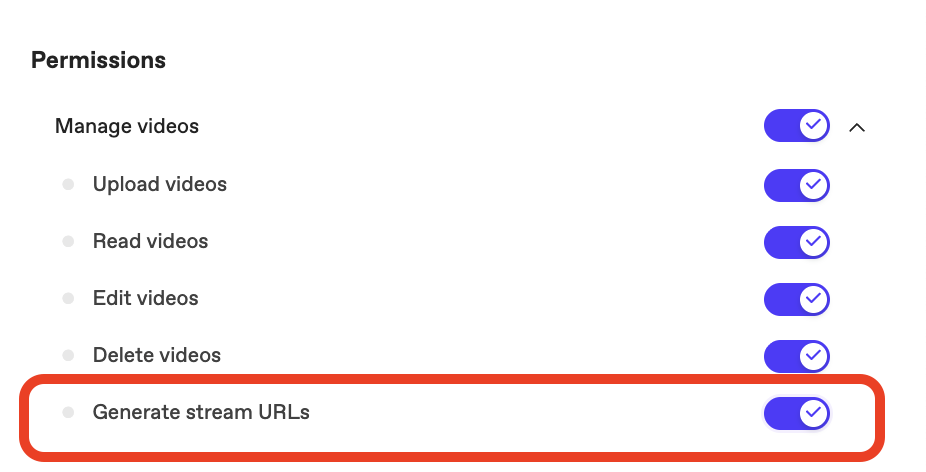
Private API key with Generate stream URLs permission
In Dailymotion Studio > Organization settings > API keys > Create API key > Private API key > Toggle on "Generate stream URLs".
1. Authenticate
To generate stream URLs via the API v2, you need an access token with the video.read scope. Refer to the authentication guide.
curl --request POST \
     --url https://oauth2.dailymotion.com/v2/token \
     --header 'accept: application/json' \
     --header 'content-type: application/x-www-form-urlencoded' \
     --data grant_type=client_credentials \
     --data scope=video.read \
     --data client_id=<CLIENT_ID> \
     --data client_secret=<CLIENT_SECRET>
2. Request download URLs
Call the download endpoint with the video ID. Replace the <VIDEO_ID> placeholder below with your own.
curl --request POST \
     --url https://api.dailymotion.com/v2/videos/<VIDEO_ID>/downloads \
     --header 'accept: application/json' \
     --header 'authorization: Bearer ••••' \
--header 'content-type: application/json'Response
By default (no request body), the endpoint returns all available renditions for that video, each with its associated video_format_id, audio_format_ids, and a ready-to-use download_url. You can narrow the result to specific formats — see “Filter by format” below.
| Field | Type | Description |
|---|---|---|
type | Enum("muxed" | "video" | "audio") | Nature of the downloadable file:
|
label | string | Human-readable quality label (ie. "HD (720p)") |
quality | string | Quality descriptor (ie. hd, sd) |
download_url | string | Time-limited, pre-signed download URL. Use this to fetch the file. |
video_format_id | string | Identifier of the video format used by the entry. null for audio-only entries. |
audio_format_ids | Array[string] | Identifier of the audio format used by the entry. null for video-only entries. |
Example response:
{
  "downloads": [
    {
      "type": "muxed",
      "label": "SD (384p)",
      "quality": "sd",
      "download_url": "https://cdndirector.dailymotion.com/cdn/H264-512x384/video/VIDEO_ID.mp4?download=1&sec=123",
      "video_format_id": "h264_aac",
      "audio_format_ids": [
        "aac_q1_0"
      ]
    },
    {
      "type": "muxed",
      "label": "HQ (480p)",
      "quality": "hq",
      "download_url": "https://cdndirector.dailymotion.com/cdn/H264-848x480/video/VIDEO_ID.mp4?download=1&sec=123",
      "video_format_id": "h264_aac_hq",
      "audio_format_ids": [
        "aac_q2_0"
      ]
    },
    {
      "type": "muxed",
      "label": "HD (720p)",
      "quality": "hd",
      "download_url": "https://cdndirector.dailymotion.com/cdn/H264-1280x720-60/video/VIDEO_ID.mp4?download=1&sec=123",
      "video_format_id": "h264_aac_hd_hfr",
      "audio_format_ids": [
        "aac_q2_0"
      ]
    },
    {
      "type": "muxed",
      "label": "FHD (1080p)",
      "quality": "fhd",
      "download_url": "https://cdndirector.dailymotion.com/cdn/H264-1920x1080-60/video/VIDEO_ID.mp4?download=1&sec=123",
      "video_format_id": "h264_aac_fhd_hfr",
      "audio_format_ids": [
        "aac_q2_0"
      ]
    }
  ]
}
download_urlare time-limitedUse them immediately to fetch the file. Do not store or cache them for later use.
3. Filter by format (optional)
To get only specific renditions, add a JSON body with specific video_format_id and/or audio_format_ids. Each value must exactly match a download entry's own format IDs.
Request example:
curl --request POST \
     --url https://api.dailymotion.com/v2/videos/<VIDEO_ID>/downloads \
     --header 'authorization: Bearer ••••' \
     --header 'content-type: application/json' \
     --data '{"video_format_id": "h264_aac_hq"}'
If a requested format ID matches no rendition, the endpoint returns 200 with an empty list ({"downloads": []}). It does not return a 422 error.
Updated 11 days ago