
Implement DRM using Dailymotion player
Set up backend JWT generation and implement DRM-protected playback with the Dailymotion Player.
You are reading API v2 documentationStill using the Legacy API? Access the Legacy API documentation.
This guide explains how to implement DRM-protected playback with the Dailymotion Player.
Before starting
- DRM must be enabled on your organization. Reach out to your Dailymotion Success Manager or our Support team.
- Configure your DRM protection settings.
- For a general introduction to DRM and supported DRM systems, see the DRM overview.
👀 Integration overview
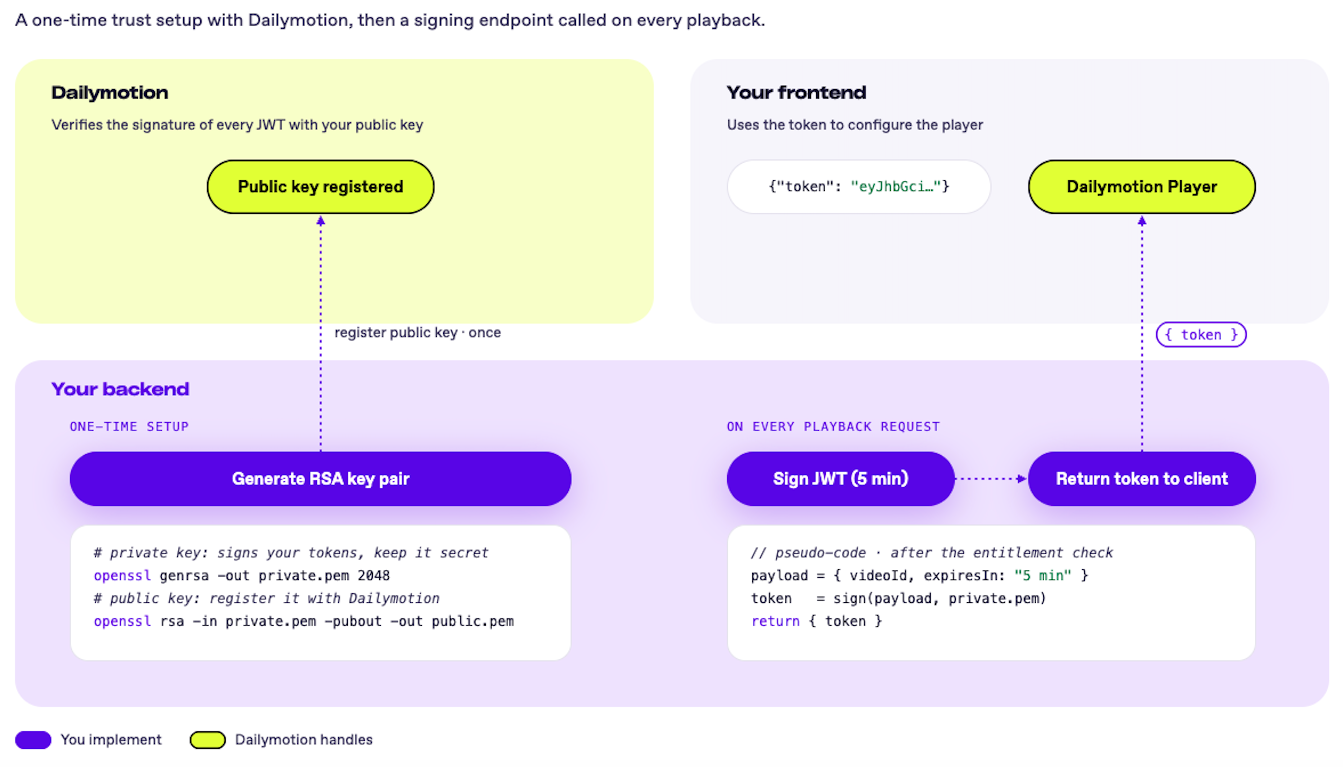
The integration is split into two workflows that run on every protected playback.
1. Set up your backend workflow
Start by setting up your signing infrastructure — this part includes a one-time setup and a recurring endpoint.
One-time setup:
Establish the trust relationship between your backend and Dailymotion. This is done once and never needs to be repeated.
- Generate an RSA key pair — Create a private key to sign your tokens and a public key to share with Dailymotion. These two keys are mathematically linked: what one signs, only the other can verify.
- Register your public key with Dailymotion — Once registered, Dailymotion can verify the authenticity of every token your backend generates. This step is required before any DRM-protected playback can work.
On every playback request:
With your keys in place, build the endpoint your frontend will call on every playback request.
- Sign a JWT — Verify the user's entitlement, build the payload, and sign a short-lived token (5 min) with your private key.
- Return the token to the client — The frontend will use it to configure the player.
2. Set up your client-side workflow
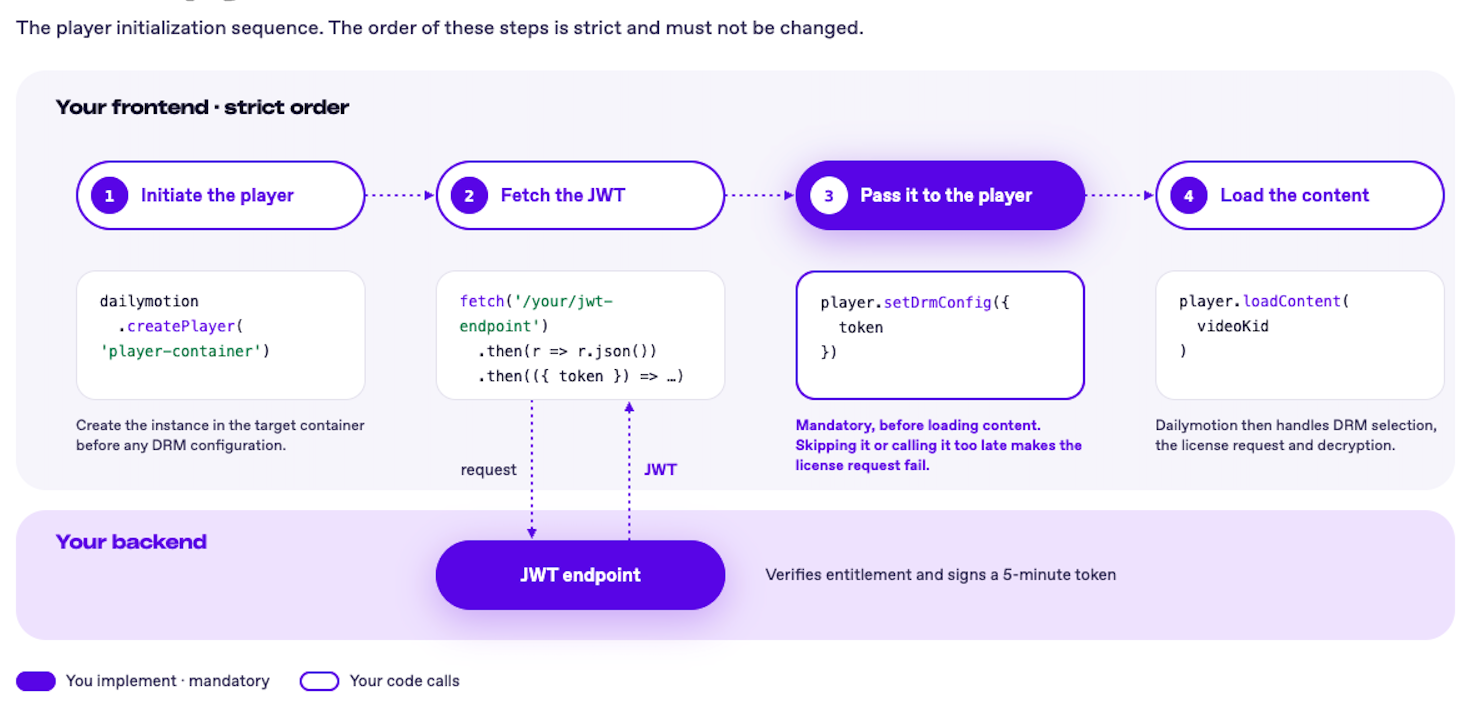
Once your backend is ready, implement the player initialization sequence on your frontend. The order of these steps is strict and must not be changed.
- Initiate the player: Create a player instance in the target container before any DRM configuration.
- Fetch the JWT: Call your backend endpoint to retrieve the signed token.
- Pass it to the player: Call
setDrmConfig({token})before loading any content. This step is mandatory. Skipping it or calling it too late will cause the license request to fail. - Load the content: Call
loadContent()with the video kID — the player handles the DRM system selection, the license request, and the decryption automatically.
TL;DR
<div id="player-wrapper"></div>
<script src="https://geo.dailymotion.com/libs/player/{PLAYER_ID}.js"></script>
<script>
  async function startSecurePlayback() {
    try {
      // Step 1 — Create player
      const player = await dailymotion.createPlayer('player-wrapper');

      // Step 2 — Fetch JWT from backend (a new token for every view: tokens are single-use)
      const response = await fetch('/api/get-drm-token?videoId=YOUR_VIDEO_KID');
      if (!response.ok) throw new Error(`Token request failed: ${response.status}`);
      const { token } = await response.json();

      // Step 3 — Configure DRM before loading content
      player.setDrmConfig({ token });

      // Step 4 — Load protected video using kID
      player.loadContent({ video: 'YOUR_VIDEO_KID' });
    } catch (error) {
      console.error('DRM Initialization Failed:', error);
    }
  }
  startSecurePlayback();
</script>
SequenceThe backend endpoint and the frontend initialization sequence must both run every time a user attempts to play a DRM-protected video.
Everything else — DRM system selection, license request, decryption — is handled automatically by the Dailymotion player.
🔧 1. Implement your back-end workflow
Generate your RSA keys
You must implement a RSA keys generation from your server in order to get started.
RS256 (RSA Signature with SHA-256) is an asymmetric cryptography algorithm : it uses two different keys for two opposite operations — one to sign, one to verify.
The two keys are mathematically linked, but knowing one does not let you compute the other :
- The Private Key holds the full secret.
- The Public Key is derived from that secret, but contains only part of it.
You can generate them by using the following code sample:
# ── Private Key ────────────────────────────────────────────────
# Used to SIGN tokens on your server. Keep this secret.
# Output: drm-platform.private.pem
openssl genpkey -algorithm RSA -out drm-platform.private.pem -pkeyopt rsa_keygen_bits:4096

# ── Public Key ─────────────────────────────────────────────────
# Derived from the private key. Used by Dailymotion to VERIFY tokens.
# Output: drm-platform.public.pem  →  share this with Dailymotion (step 3)
openssl rsa -pubout -in drm-platform.private.pem -out drm-platform.public.pem
RSA Private key storageNever store it in your codebase. Git keeps a full history — even if you delete the file later, the key remains accessible in past commits.
Instead, load it at runtime from a secret manager (AWS Secrets Manager, HashiCorp Vault) or an environment variable.
Register your RSA public key with Dailymotion
When your player requests a DRM license, it sends the signed JWT to Dailymotion's DRM server.
To validate it, Dailymotion verifies the JWT's cryptographic signature — which requires your RSA public key. Without it, Dailymotion has no way to distinguish a legitimate token from a forged one.
You can register the public key via API v2 or directly from your Studio.
Keep the RSA private key secure on your backend. Never send it to Dailymotion or expose it to the client.
Build your JWT payload
The JWT payload is a set of claims embedded in the signed token.
It defines which video is authorized, when the token was issued, and when it expires. Without it, a valid signature would only prove that a token came from a trusted source, but nothing about what it actually grants access to.
Because the payload is included in the signed data, any attempt to modify it (changing the video ID, extending the expiry) immediately invalidates the signature. This is what makes the token both tamper-proof and strictly scoped: one video, one time window, one use.
The payload is a plain JSON object with four required fields:
| Claim | Key | Type | Description |
|---|---|---|---|
| JWT ID | jti | string | Unique UUID, generated for every token. Tokens are single-use: each new playback (new view, page refresh, player reload) needs a new token. |
| Video ID | videoId | string | Binds the token to a single video. A token for k1234533 cannot unlock any other video. |
| Issued At | iat | integer | Unix timestamp (seconds) of the moment when the token was issued. Used by Dailymotion to validate the time window. |
| Expiration | exp | integer | Unix timestamp (seconds) when the token expires. After this timestamp, the token is unconditionally rejected. |
Important
- All timestamps must be in Unix Epoch Seconds.
- A short expiration window is recommended to minimize interception risks. A window of 5 minutes (
exp = iat + 300) is preferred.- The token must be signed using your RSA Private key using RS256 (RSA Signature with SHA-256).
- Token generation must occur on your secure server. Never generate tokens on the client side.
- Generate a new token for every playback: never cache or reuse a token.
const jwt = require('jsonwebtoken');
const { v4: uuidv4 } = require('uuid');

/**
 * Generates a Scoped License Token for Dailymotion DRM
 * @param {string} videoId - The Dailymotion Video kID
 * @param {string} privateKey - Your RSA Private Key
 * @returns {string} Signed JWT
 */
function generateDRMToken(videoId, privateKey) {
    const iat = Math.floor(Date.now() / 1000);
    const exp = iat + 300; // 5-minute expiration window
    const jti = uuidv4();

    const payload = {
        videoId: videoId,
        iat: iat,
        exp: exp,
        jti: jti
    };

    return jwt.sign(payload, privateKey, { algorithm: 'RS256' });
}
Once built, the payload is passed to your signing function, it becomes the data that gets cryptographically signed with your private key.
🖥️ 2. Implement your client-side workflow
Use the video kID, not the public video IDDRM-protected videos must always be referenced using their kID (the internal key identifier assigned to the DRM-protected asset), not their public video ID. Using a public ID for a DRM-protected video will result in a playback error.
Security reminderThe example above shows the token parameters being built on the client side for illustration purposes. In production, token signing must always happen on your secure backend — never expose your RSA private key on the client side.
Add player script
Add the player script in your webpage with a target div:
<div id="player-wrapper" style="width: 640px; height: 360px;"></div>
<script src="https://geo.dailymotion.com/libs/player.js"></script>
Fetch the JWT from your backend and configure DRM
Call your backend endpoint to retrieve the signed token, then pass it to setDrmConfig() before loading any content:
const response = await fetch('/api/get-drm-token?videoId=YOUR_VIDEO_KID');
const { token } = await response.json(); // where token is your RS256-signed JWT returned by your backend endpoint

// Configure DRM — must happen before loadContent()
player.setDrmConfig({ token });
Load your content
Use the loadContent() method along with the video parameter, filled with the video kID:
// Replace YOUR_VIDEO_KID with your actual video kID
player.loadContent({ video: 'YOUR_VIDEO_KID' });
When the call is triggered, the following sequence of operations will start:
- Fetch the content — The player first requests the video manifest listing all the video streams available (resolutions, bitrates, formats) and signals that the content is DRM-protected.
- Detect the DRM system — The player inspects the manifest to determine which DRM system is required (Widevine, FairPlay, or PlayReady) based on the user's browser and device. This is automatic.
- Request a DRM license — The player sends a license request to Dailymotion's DRM server. This is where the token stored via
setDrmConfig()is used — it is attached to the request as proof of authorization. Dailymotion verifies the token and, if valid, returns the decryption key. - Decrypt and play — The player uses the decryption key from the license to decrypt the video stream in real time. Playback begins.
Video kID must match JWT informationThe kID passed to
loadContent()must exactly match thevideoIdclaim in your JWT. If they differ, Dailymotion's DRM server will reject the license request with a403 Scope Mismatcherror.
Complete client-side set-up example
<div id="player-wrapper" style="width: 640px; height: 360px;"></div>
<script src="https://geo.dailymotion.com/libs/player.js"></script>

<script>
  async function startSecurePlayback() {
    try {
      // Step 1 — Create the player
      const player = await dailymotion.createPlayer('player-wrapper');

      // Step 2 — Fetch a NEW JWT from your backend for every playback (tokens are single-use)
      const response = await fetch('/api/get-drm-token?videoId=YOUR_VIDEO_KID');
      const { token } = await response.json();

      // Step 3 — Configure DRM before loading content
      player.setDrmConfig({ token });

      // Step 4 — Load the protected video (using the kID)
      player.loadContent({ video: 'YOUR_VIDEO_KID' });

    } catch (error) {
      console.error('DRM Initialization Failed:', error);
    }
  }

  startSecurePlayback();
</script>
🔍 Troubleshoot DRM
How to find DRM errorsThe Dailymotion player does not surface specific DRM error messages in its UI. To identify the exact error, open your browser's Developer Tools and inspect the Network tab for failed license requests.
401 - Invalid signature
Re-check your key pair — the Public Key registered with Dailymotion must match the Private Key you used to sign the token.
openssl rsa -in drm-platform.private.pem -pubout | diff - drm-platform.public.pem401 - Token expired
Ensure exp is in seconds and (not milliseconds) and that your server time is synced.
403 - Scope mismatch
The videoId in the JWT must exactly match the video ID passed to loadContent(). Check for typos or encoding differences.
400 - Algorithm error
Ensure the JWT header specifies RS256. HS256 will be rejected.
Playback error
Ensure setDrmConfig() is called before loadContent().
⚠️ Current limitations
DRMs aren't currently compatible with the following features:
- Recommendations — Videos auto-suggested at end of playback.
- Playlists — Clicking on another video from a playlist containing DRM videos results in a playback error.
- AV1 codec — DRMs are only compatible with H264 at the moment.
Updated 2 days ago