
Create & download a report
In this guide, we’ll show you the steps to authenticate using a private API key to create and download reports via the Reporting API .
1. Generate a private API key
Owner-level access required"Manage reports" section is only visible to Owners.
Follow the dedicated guide to create a private API Key from your Dailymotion Studio.
While creating your private API key, make sure to toggle on any permissions you may need in the “Manage reports” section:
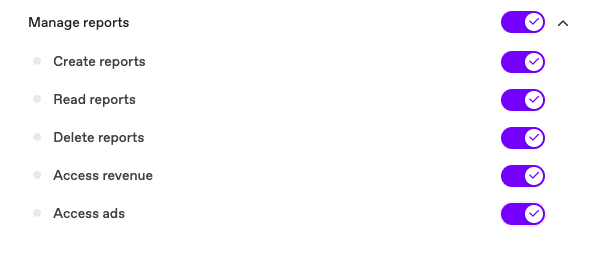
Once created, you’ll retrieve an API key and API secret. For security reasons, the API secret is only displayed once: store it safely before closing the window.
2. Authenticate
Use your API key to generate an access token and authenticate.
Make a POST request to https://oauth2.dailymotion.com/v1/token with the following parameters:
grant_type: Set toclient_credentialsclient_id: Your API key from step 1client_secret: Your API secret from step 1scope:analytics.manageanalytics.read. See all scopes & bundles.
curl -X POST "https://oauth2.dailymotion.com/v2/token" \
  -H "Content-Type: application/x-www-form-urlencoded" \
  -d "grant_type=client_credentials" \
  -d "client_id=<your_api_key>" \
  -d "client_secret=<your_api_secret>" \
  -d "scope=analytics.manage analytics.read"
Response:
{
  "access_token": "<your_access_token>",
  "token_type": "Bearer",
  "expires_in": 36000,
  "scope": "analytics.manage analytics.read"
}
Pass the access_token as a Bearer token in the Authorization header for all subsequent requests.
3. Generate a report
Reports are generated asynchronously. On success, the API returns a HTTP 201 response and the report immediately goes in status: processing. You must poll (see step 4) until status: finished before downloading your report.
Endpoint:
POST https://api.dailymotion.com/v2/organizations/{organization_id}/analytics_reportsRequest body:
| Field | Type | Description |
|---|---|---|
name * | string | Name for this report (max 255 chars) |
start_at * | string (ISO 8601) | Start date of the reporting period (ie. 2026-07-01) |
end_at * | string (ISO 8601) | End date of the reporting period (ie. 2026-07-04) |
metrics * | array[string] | Metrics to measure (ie. ["VIEWS"]). See all metrics. |
dimensions * | array[string] | Breakdown dimensions (ie. ["DAY", "VIDEO_TITLE"]). See all dimensions. |
filters | object | Key-value pairs to narrow down the data. See all filters. |
product_type | string | Scope the report to a product. One of: all, content, claim, embed. Defaults to content |
*Required fields
Important
end_atmust be afterstart_at.- Future dates are not allowed for
end_at.- Date range cannot exceed 180 days.
- Parameters are case sensitive.
- Metrics and dimensions aren’t all compatible with each other. Refer to the Compatibility matrix.
- CSV reports generated in UTC timezone.
Request example:
// Replace <YOUR_ORGANIZATION_ID> and <YOUR_PROFILE_NAME> with your own ones.

curl -X POST "https://api.dailymotion.com/v2/organizations/<YOUR_ORGANIZATION_ID>/analytics_reports" \
  -H "Authorization: Bearer <your_access_token>" \
  -H "Content-Type: application/json" \
  -d '{
    "name": "Weekly Views Report",
    "start_at": "2026-06-01",
    "end_at": "2026-06-07",
    "metrics": ["VIEWS"],
    "dimensions": ["DAY", "VIDEO_TITLE"],
    "product_type": "content",
    "filters": {
      "video_owner_profile_name": "<YOUR_PROFILE_NAME>"
    }
  }'
In this example, we are generating a report gathering the VIEWS per DAY and VIDEO_TITLE for the Dailymotion profile defined in the filter video_owner_profile_name. This report will only show data from the profile’s uploaded CONTENT for the time frame 2026-06-01 to 2026-06-07.
Response:
By default, the response returns name, status, and created_at. You can request additional fields using the fields query parameter (see field selection).
{
  "name": "Weekly Views Report",
  "status": "processing",
  "created_at": "2026-06-10T10:00:00Z"
}
To also receive the report_token (useful for polling), add ?fields=name,status,created_at,report_token to the request URL.
4. Download report
Reports can take up to two hours to generate. Poll this endpoint periodically and check the status field in the response. Once this reads finished, your report is ready to download.
There are two ways to track your report:
- By
report_token: If you saved the token from the generate response (see step 3), you can match it in the list to find your specific report. - By
name: If you didn't save the token, look for your report by thenameyou gave it.
// Replace <YOUR_ORGANIZATION_ID> with your own.

curl -X GET "https://api.dailymotion.com/v2/organizations/<YOUR_ORGANIZATION_ID>/analytics_reports?fields=name,status,report_token,report_urls" \
  -H "Authorization: Bearer <your_access_token>"
Response:
While the report is processing, report_urls is null, you can keep polling.
{
  "data": [
    {
      "name": "Weekly Views Report",
      "status": "processing",
      "report_token": "<REPORT_TOKEN>",
      "report_urls": null
    }
  ],
  "pagination": {
    "page": 1,
    "page_size": 10,
    "total": 1,
    "next": null,
    "previous": null
  }
}
When the report is ready, report_urls is now populated. Use the URL to download your CSV file.
{
  "data": [
    {
      "name": "Weekly Views Report",
      "status": "finished",
      "report_token": "<REPORT_TOKEN>",
      "report_urls": [
        "https://link-to-your-report.csv"
      ]
    }
  ],
  "pagination": {
    "page": 1,
    "page_size": 10,
    "total": 1,
    "next": null,
    "previous": null
  }
}
Important
report_urlsare temporary. Once the report's status becomesexpired, those links stop working. Make sure to download the file promptly after the report reachesfinishedstatus.
Field selection
Use the fields query parameter to request only the fields you need. This applies to both the create response and the list endpoint.
curl -X GET "https://api.dailymotion.com/v2/organizations/<YOUR_ORGANIZATION_ID>/analytics_reports?fields=name,status,report_token,report_urls,start_at,end_at" \
  -H "Authorization: Bearer <your_access_token>"
Rule:
- No
fieldsparam → Returns default fields only:namestatuscreated_at. - Fields specified → Returns only requested fields.
| Available fields | Description |
|---|---|
name | Name of the report. |
status | Current processing state:processing finished failed expired |
created_at | Timestamp when the report was created. |
created_by | User who created the report. Use dot notation to select sub-fields, ie. created_by.display_name. |
start_at | Start date of the reporting period. |
end_at | End date of the reporting period. |
has_revenue_info | Whether the report contains revenue data. |
report_token | Unique token identifying the report, useful for polling. |
report_urls | Temporary download URLs, populated only when status is finished. |
Updated 4 months ago